How to Play Maths Tug of War
To play maths tug of war, two players or teams answer maths questions at the same time, and every correct answer pulls a shared rope toward their side. Get five steps ahead and you win on the spot. If the clock runs out first, whoever is ahead wins. A match takes under three minutes, and the rules below are all you need.
What are the rules of maths tug of war?
The rope starts in the middle.
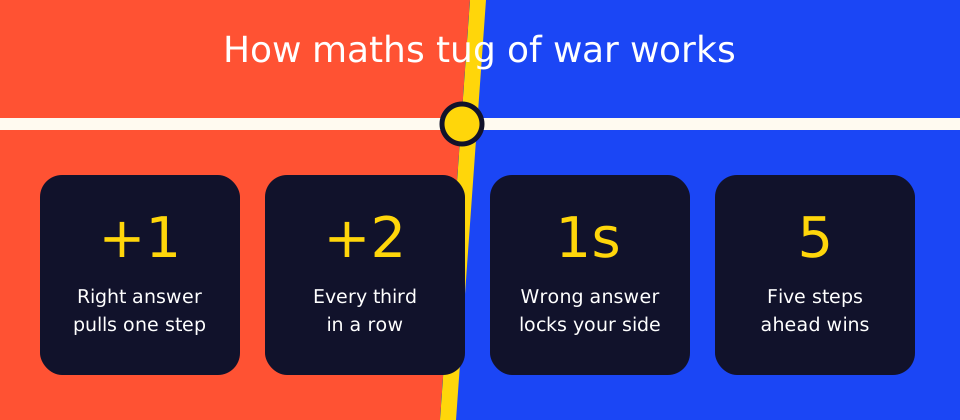
A correct answer pulls one step.
Every third correct answer in a row is a power pull worth two steps.
A wrong answer does not move the rope, ends your streak and locks your buttons for one second.
A lead of five steps wins immediately.
When the timer ends, the team ahead wins. A level rope is a draw.
Neither team waits for the other. Each side has its own question and four answer buttons, so a quick team can answer several questions while a slower one works on its first. The other team's answers do not break your streak. Only your own wrong answer does.
A match, played through
Red answers 6 × 4 correctly, so the rope moves one step toward Red. Blue answers 9 + 8 correctly and the rope returns to the middle. Red answers again for one step. Red's next correct answer is its third in a row, so it is a power pull of two, and Red is three steps ahead. One more correct answer makes it four.
Blue panics and taps a wrong answer. Blue's buttons lock for one second and its streak is gone. That second is enough for Red to answer once more, reach a five-step lead and win. Blue's real loss was not the wrong answer itself. It was the second of lost time at the moment Red needed one more step.
What really decides a match?
Speed decides far more than most players expect. We simulated 40,000 matches for each pairing below, using the game's exact rules over 90 seconds. Answer times and accuracy are assumptions we chose to test, with each answer varying by up to 20%, so treat these as a model of the rules and not as data from real players.
Player A | Player B | A wins | B wins |
|---|---|---|---|
3 seconds, 90% right | 2.5 seconds, 90% right | 10% | 88% |
3 seconds, 95% right | 2 seconds, 70% right | 64% | 34% |
3 seconds, 95% right | 2 seconds, 80% right | 22% | 76% |
3 seconds, always right | Guessing at 0.7 seconds | 99% | 1% |
8 seconds, always right | Guessing at 0.7 seconds | 27% | 66% |
Three lessons come out of those numbers. First, half a second per answer is a huge edge between otherwise equal players, so two people of different ability will rarely have a close match on the same level. Second, rushing only pays if accuracy holds: dropping to 70% loses to a slower, careful player, while holding 80% beats them. Third, guessing is a poor plan unless the questions are so hard that each one takes around eight seconds. If a player starts guessing, the level is probably too high.
How do you make a match fair?
Give each team its own level. Open the settings under the Play buttons and choose from six levels, from Starter (up to 5) to Master (up to 100). A correct answer pulls the same distance at any level, so a beginner on small numbers can hold their own against someone confident on large ones. Aim for levels where both sides answer at about the same speed. Our guide to mixed-ability matches goes further.
Which match length should you pick?
Choose 60 seconds, 90 seconds, 2 minutes or 3 minutes. Between evenly matched players answering every 4 seconds at 90% accuracy, our simulation found a 60-second match ended early with a five-step lead only 31% of the time, and 14% were draws. At 3 minutes, 80% ended with a clear lead and fewer than 4% were draws. Use 60 or 90 seconds for quick turns in a group, and 2 or 3 minutes when you want a decisive result or the questions need thinking time.
Controls on touchscreens and keyboards
Tap your team's answers on a touchscreen. On a keyboard, the left team uses Q W E R and the right team uses U I O P, with each key matching one of the four answers in order. Before using a shared classroom display, check that it accepts two touches at once, or connect a keyboard.
Ways to play
Two players on one screen: press Play: 2 Players and sit on either side.
Alone: press Play: vs Robot and choose a Gentle, Steady or Fast robot in the settings.
Online rooms: create a room and invite up to 15 others with its room ID, link or QR code.
A group tournament: build a knockout for 2 to 16 teams or a league for up to 8.
No screen at all: play the dice version on paper.
Topics you can choose
The settings cover the four operations, number bonds, doubles and halves, missing numbers, fractions, decimals, percentages, negative numbers, order of operations, algebra, and squares and square roots. There are ready-made mixes for kindergarten and grade 1, grades 2 and 3, grades 4 and 5, and middle school. For multiplication and division you can tick exact tables, and you can also write your own questions.
Good starting settings
If you are | Try |
|---|---|
New to number facts | Addition, Easy level, 2-minute match |
Learning times tables | Tick the 2s, 5s and 10s, then add one table at a time |
Playing a stronger opponent | Lower your own level until the rope stays near the middle |
A confident adult | Master level, or percentages and algebra |
What to do after the match
The review list shows the questions each team got wrong, with the correct answers. Pick one or two and work out why they went wrong before playing again. A 2025 research review in Psychological Science in the Public Interest, led by Nicole McNeil, recommends this order: understand the facts, practise them briefly under time, then talk them through. If a topic is brand new, teach it first, because a clock only rewards guessing before answers are accurate. Read what the research says about competitive maths for the detail.
Frequently asked questions
Can you play maths tug of war online with friends?
Yes. Create an online room and share its room ID, invite link or QR code. A room holds up to 16 players on their own devices.
How many steps do you need to win?
In a one-screen match, a team wins when it is five steps ahead. If the timer ends first, the team that is ahead wins.
Can I play maths tug of war alone?
Yes. Choose Play: vs Robot and set the robot to Gentle, Steady or Fast in the settings.